


 Written by
You can list hundreds of products on your online store, write catchy product titles, add detailed descriptions, and upload high-quality images. But is that enough to get your products noticed on Google?
Not really!
There is another important piece that many online store owners overlook: Ecommerce Schema Markup.
Google needs more than product titles and descriptions to understand what you are selling. It needs structured information about your products, including their prices, availability, ratings, reviews, and other important details.
That's where ecommerce schema markup comes in. It helps search engines understand your product pages and makes your products eligible for enhanced search appearances, such as Google Product Snippets. Whether you run a Shopify store or a custom-built ecommerce website, structured data can play an important role in your SEO strategy.
Let's understand what it is and why your online store needs it..
What Is Ecommerce Schema Markup?
Ecommerce schema markup is a type of structured data added to your website's code to help search engines understand your products and their details.
It provides Google with specific information about your products, such as product names, prices, availability, customer ratings, reviews, and shipping details, rather than leaving search engines to interpret everything from page content.
According to Google's research on Indian shoppers, 96% of Indian shoppers research products online before completing a purchase, while 46% check product inventory online before visiting a store. This makes accurate product information and availability particularly important for online retailers.
By implementing the right schema markup for an ecommerce website, you can help Google interpret these product details and make your pages eligible for rich search experiences. For online stores, this means giving search engines clearer product information while helping shoppers see relevant details directly in search results.
Why Schema Markup is Important for Ecommerce Websites
Having great products is one thing, but making sure Google understands what you sell is equally important. Search engines need clear product information to interpret your pages and decide whether they qualify for enhanced search appearances.
That's why schema markup for ecommerce websites matters. It gives search engines structured product information and helps your online store communicate important details more clearly.
Help Search Engines Understand Product Information
Google doesn't shop on your website like a customer. It reads your page content, examines its structure, and uses available signals to understand what each page offers.
With structured data for ecommerce, you can provide specific information about product names, brands, prices, availability, ratings, and other attributes in a format that search engines can interpret. This reduces ambiguity and helps Google connect the right information with the right product.
Become Eligible for Google Product Snippets
Ever noticed product listings on Google showing prices, ratings, availability, or special offers even before you visit the website?
That's where product structured data comes into play. By adding relevant Product and Offer schema, you can make your product pages eligible for Google product snippets and other product-rich results.
For ecommerce businesses, this creates another opportunity to catch shoppers' attention when they are comparing products and deciding what to buy. However, displaying these enhanced results is ultimately Google's decision, not a guaranteed outcome.
Improve Consistency Across Product Data Sources
Your product information may appear in multiple places, including your website, Google Search, Google Merchant Center, and shopping platforms. But what happens when your website shows a product as available while Google displays it as out of stock?
Such inconsistencies can confuse shoppers and affect their buying decisions.
As per recent research, 80% of online shoppers say inaccurate product information negatively affects their perception of a brand, while 83% are likely to leave a product page if they cannot find the information they need.
With ecommerce schema markup, you can provide Google with structured product details that help it understand and verify information such as pricing, discounts, and stock availability. When combined with an updated Google Merchant Center product feed, it can also help reduce mismatches between different data sources.
Support Better Product Discovery
Your customers don't always search for products by visiting your website directly. Some discover products through Google Search, Google Images, Google Lens, and other shopping experiences.
A well-implemented online store schema helps search engines understand your product information and makes eligible product pages available for richer appearances across these platforms. This gives shoppers more opportunities to discover your products while searching for something they want to buy.
7 Important Schema Types for Ecommerce Websites
1. Product Schema
Imagine you run an online store selling footwear. You have hundreds of shoes listed on your website, each with different brands, sizes, colors, materials, and designs. How will Google understand the specific details of each product?
That's where Product schema comes in.
Product schema provides search engines with structured information about individual products listed on your website. It helps Google identify what you're selling and understand important product attributes, making eligible product pages available for enhanced search appearances, including Google Product Snippets and Merchant Listings.
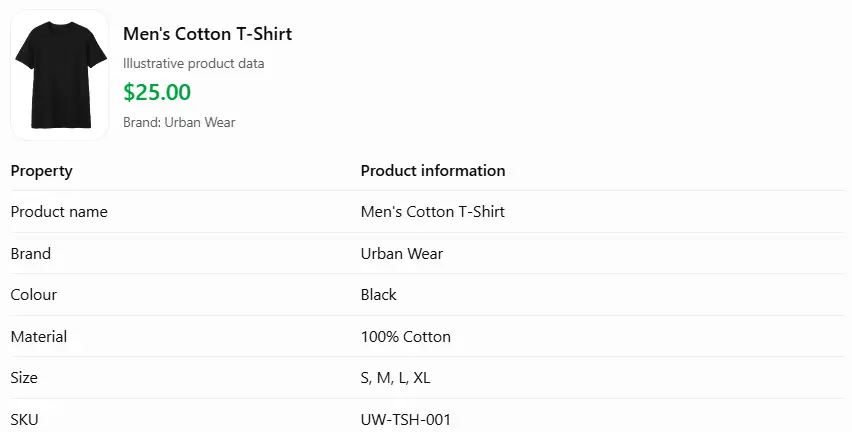
Some important properties you can include in Product schema are:
-
Product Name
-
Product Description
-
Brand
-
Product Image
-
SKU
-
GTIN or Product ID
-
Color
-
Size
-
Material
-
Dimensions
-
Offers
-
Aggregate Rating
Example:
Suppose you run a Shopify clothing store and sell a men's cotton T-shirt. Your Product schema can communicate the following information to Google:
2. Offer Schema for Price and Availability
What is the first thing most shoppers check when they find a product they like? It's price and availability.
Imagine a customer finds your product on Google, clicks through to your website, and discovers that the displayed price is different or the product is unavailable. That's a frustrating experience that can affect their buying decision.
Offer schema helps search engines understand the commercial details of a product, including its selling price, currency, availability, and other offer-related information.
It is generally added as a property within Product schema rather than implemented as an independent product page markup.
Some important properties of Offer schema include:
-
Price
-
Price Currency
-
Availability
-
Price Valid Until
-
Item Condition
-
Product URL
-
Shipping Details
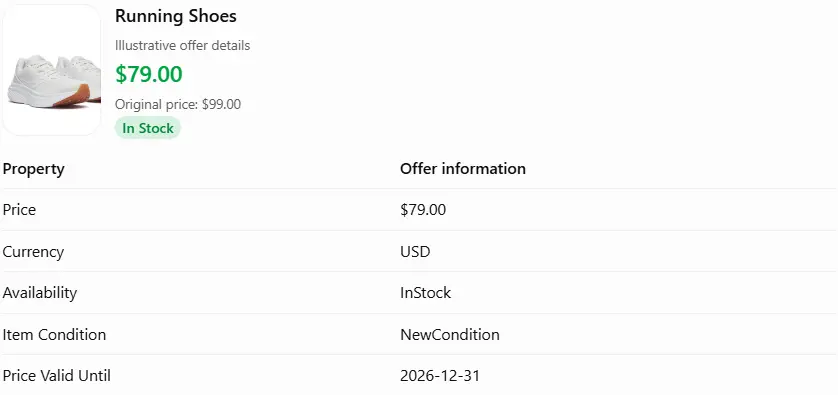
Example:
Suppose you're selling a pair of running shoes at a discounted price. Your Offer schema can communicate the following details:
3. Review and Aggregate Rating Schema
Before purchasing a product online, many shoppers look at what other customers have to say. They check star ratings, read customer experiences, and sometimes compare reviews across different websites.
In fact, according to Syndigo's 2026 State of Product Experience research, 53% of shoppers consider ratings and reviews among their top purchase decision factors, ranking them ahead of discounts at 49%. The study surveyed 8,736 consumers across six countries.
This makes customer feedback an important part of an ecommerce product page.
Review and Aggregate Rating are properties that can be added to Product schema to help search engines understand customer feedback associated with a product.
-
Review: Provides details about an individual customer's review, including the reviewer's name, rating, and comments.
-
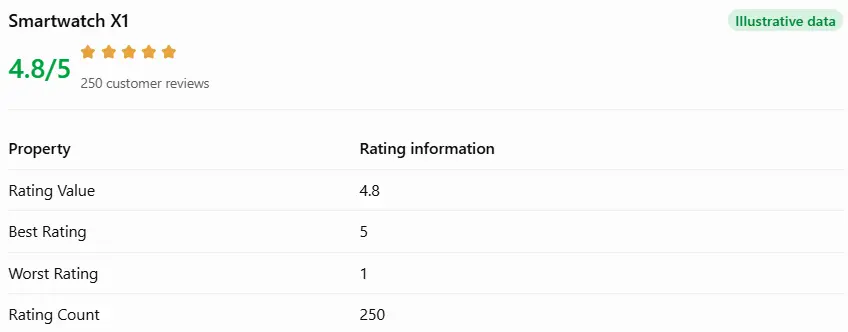
AggregateRating: Represents the combined ratings from multiple customers, including the average rating and total number of reviews.
Example:
Suppose you sell a smartwatch that has received 250 customer reviews, with an average rating of 4.8 out of 5.

4. Product Group Schema for Product Variants
Selling a product in multiple sizes, colors, patterns, or materials? You might have one T-shirt available in five colors and four different sizes.
Although these are different product variations, they belong to the same parent product.
This is where the ProductGroup schema becomes useful.
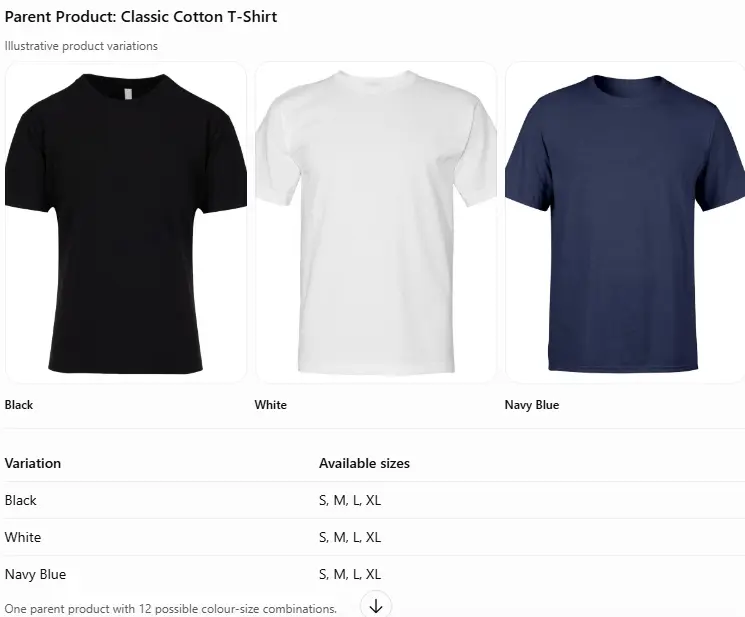
ProductGroup helps Google understand the relationship between different variations of the same product. Instead of treating every variation as an unrelated product, it communicates how individual products belong to a common product group.
This is particularly useful for fashion, footwear, furniture, electronics, and other ecommerce categories where products come in multiple variations.
Some important properties include:
-
Product Group Name
-
Product Group ID
-
Varies By
-
Has Variant
-
Brand
-
Product Name
-
SKU
-
Color
-
Size
Example:
Suppose your online store sells a cotton T-shirt in three colors and four sizes.
5. Organization Schema
Your products are important, but Google should also understand the business selling them.
Whether you operate a Shopify store, a D2C brand, or a large ecommerce marketplace, Organization schema helps search engines identify your business and understand its official details.
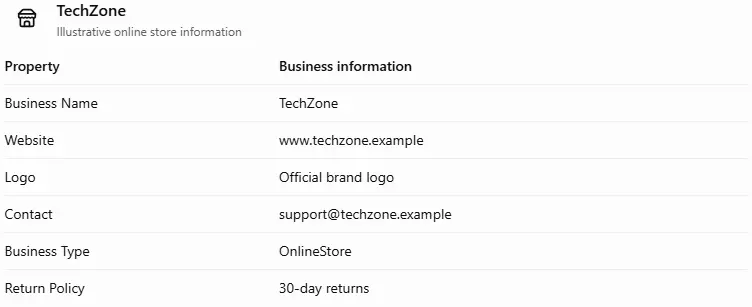
It communicates information about your company, such as its name, website, logo, contact details, business identifiers, and return policies. For an ecommerce brand, you can also consider the more specific OnlineStore subtype where applicable.
Some important properties include:
-
Business Name
-
Website URL
-
Company Logo
-
Contact Information
-
Business Address, if applicable
-
Social Media Profiles
-
Business Identifiers
-
Return Policy
Example:
Suppose you own an online electronics store called TechZone. You can use the organization schema to communicate the following information:
6. BreadcrumbList Schema
Have you ever visited an ecommerce website and noticed a navigation trail at the top of a product page?
For example:
Home → Men's Clothing → T-Shirts → Classic Cotton T-Shirt
This navigation trail is called a breadcrumb. It shows shoppers where they are within your website's hierarchy and gives them a convenient way to return to previous categories.
BreadcrumbList schema helps search engines understand this navigation structure. It communicates the relationship between different website pages and helps Google identify where a particular product or category belongs.
Some important properties include:
-
ItemListElement
-
Position
-
Name
-
Item URL
Example:
Suppose a customer lands directly on a product page for a men's cotton T-shirt. Your BreadcrumbList schema can communicate its position within the website.
7. Video Object Schema
Product images are useful, but sometimes customers want to see a product in action before making a purchase.
For example, someone buying a smartwatch might want to watch a demonstration of its display, features, and fitness tracking capabilities. Similarly, someone purchasing furniture might prefer watching a video showing its design, dimensions, and actual appearance.
This is where VideoObject schema comes in.
VideoObject is a type of structured data that provides search engines with information about videos published on your website. It helps Google understand the video title, description, thumbnail, upload date, duration, and other relevant details.
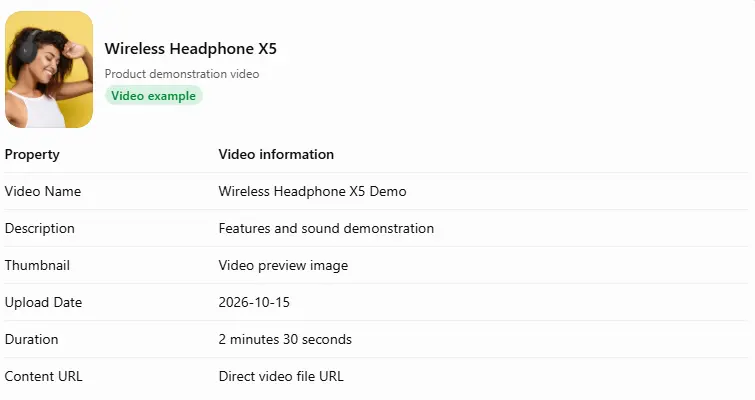
Some important properties include:
-
Video Name
-
Video Description
-
Thumbnail URL
-
Upload Date
-
Duration
-
Content URL
-
Embed URL
Example:
Suppose you run an electronics store and have uploaded a product demonstration video for a wireless headphone. Your VideoObject schema can communicate the following details:
Which Schema Markup Should You Use on Each Ecommerce Page?
Adding schema markup to your website doesn't mean using every type on every page. Each page serves a different purpose, so the structured data should match the information visitors can actually find there.
For example, a product page needs product details, pricing, and availability information, while your homepage needs to communicate your business identity.
Here's a quick breakdown of which schema markup you should consider for different ecommerce pages.
|
Ecommerce page |
Recommended schema |
Purpose |
|
Product page |
Product, Offer, AggregateRating, Review |
Communicates product details, pricing, availability, and customer ratings to search engines. |
|
Product page with variants |
ProductGroup, Product, Offer |
Connects different product variations, such as sizes, colors, and materials, with their parent product. |
|
Category or collection page |
CollectionPage, ItemList, BreadcrumbList |
Helps search engines understand product collections, category information, and the relationship between listed products. |
|
Homepage |
Organization or OnlineStore, WebSite |
Provides business identity, brand details, website information, and contact information. |
|
Breadcrumb navigation |
BreadcrumbList |
Communicates the website's navigation hierarchy and helps Google understand how pages are connected. |
|
Customer review content |
Review, AggregateRating |
Describes genuine customer reviews and combined product ratings. |
|
Product video page or relevant product video |
VideoObject, Product |
Provides information about product videos, including their title, thumbnail, description, and upload date. |
|
Physical store location page |
LocalBusiness or a relevant subtype |
Communicates store-specific details, including address, opening hours, and contact information. |
How to Implement Ecommerce Schema Markup
Adding ecommerce schema markup to your website doesn't have to be complicated. Whether you're using Shopify, WooCommerce, or a custom-built ecommerce platform, you can follow a few practical steps to add structured data to your product and category pages.
Here's how to get started.
Step 1: Audit Existing Structured Data
Before adding new markup, check whether you have structured data for ecommerce website. Many ecommerce themes and SEO plugins automatically generate basic schema markup.
Use Google's Rich Results Test to identify existing markup, errors, and missing properties. This also helps you avoid duplicate schema implementations.
Step 2: Select the Appropriate Schema Types
Choose schema types according to the purpose of each page. For example, use Product and Offer schema for product pages, ProductGroup for product variations, and Organization or OnlineStore schema for your homepage.
Avoid adding irrelevant schema types just to include more structured data.
Step 3: Implement JSON-LD
Google recommends JSON-LD as the preferred format for adding structured data to websites.
You can also refer to Google's structured data guidelines to understand the supported formats, technical requirements, and content policies before implementing markup on your website.
You can add JSON-LD directly to your website's HTML, usually within the head or body section. Shopify users can add custom JSON-LD through their theme files, while other platforms may offer plugins or built-in schema settings.
Step 4: Keep Structured Data Consistent With Visible Content
Make sure the information in your schema markup matches what customers see on your website.
For example, if your product page displays a price of $49 and shows the product as out of stock, your structured data should reflect the same details. Avoid adding hidden, misleading, or outdated product information.
Step 5: Test and Validate the Markup
Once you've implemented the markup, test it using Google's Rich Results Test and Schema Markup Validator.
These tools help identify errors, missing properties, and issues that could prevent your pages from qualifying for rich results.
Step 6: Monitor and Maintain Structured Data
Schema markup isn't a one-time task. Product prices, discounts, stock availability, and customer ratings can change regularly.
Review your structured data whenever you update your website, introduce new products, or change your ecommerce theme. You can also monitor structured data issues through Google Search Console to identify problems that need attention.
If you face any issues in the implementation part, then you can connect with us for e-commerce SEO services; our experience and dedicated team will help you out through this situation.
How to Add Schema Markup to Shopify and WooCommerce Stores
The process of adding schema markup depends on the ecommerce platform you're using. Shopify and WooCommerce offer different ways to manage structured data, while custom-built websites may require manual implementation.
Let's look at how you can add schema markup to each platform.
Schema Markup for Shopify
If you're running a Shopify store, you may already have some basic structured data generated by your theme. Many Shopify themes include Product schema by default, but the type and quality of markup can vary.
Here's how you can add or manage schema markup on Shopify:
-
Check your existing theme: Inspect your product pages using Google's Rich Results Test to see whether Product schema is already present.
-
Use Shopify apps: You can find SEO apps in the Shopify App Store that help add product, review, breadcrumb, and organization schema.
-
Edit theme code: If you need more control, add custom JSON-LD to your Shopify Liquid theme files.
-
Avoid duplicate markup: Check whether your theme and SEO app are generating the same schema types before adding new code.
For example, if you're selling clothing, your Shopify product pages should communicate details such as product name, brand, price, availability, and product variants through the appropriate structured data.
Schema Markup for WooCommerce
WooCommerce offers more flexibility because it runs on WordPress, allowing you to manage structured data through plugins or custom code.
WooCommerce automatically generates basic Product structured data for product pages, including information such as product names, prices, and availability.
To manage or add more schema types, follow these approaches:
-
Use SEO plugins: Plugins such as Yoast SEO and Rank Math can help manage structured data and other SEO settings.
-
Configure product information: Add accurate product descriptions, prices, SKUs, stock status, and product attributes through your WooCommerce product settings.
-
Add custom schema: If you need additional markup, such as ProductGroup or VideoObject, you can add custom JSON-LD through your theme or a suitable plugin.
-
Check existing markup: Test your product pages to identify duplicate schema generated by WooCommerce, your theme, or installed plugins.
For example, if you sell furniture with different colors and sizes, you can use the ProductGroup schema to connect individual variations with their parent product.
WooCommerce also provides documentation on rich snippets and schema markup to help store owners manage structured data.
Schema Markup for Custom Ecommerce Websites
If your ecommerce website is built using a custom technology stack, you have greater control over how structured data is generated and displayed.
However, implementing schema markup may require assistance from a developer, particularly when managing large product catalogues or frequently changing product information.
Here's what you should consider:
-
Use JSON-LD: Add structured data to the relevant page templates using JSON-LD.
-
Connect product data: Pull information such as product names, prices, SKUs, ratings, and availability directly from your product database.
-
Handle product variations: Use ProductGroup and Product schema to describe different product variations accurately.
-
Automate updates: Make sure changes to product prices, discounts, and stock availability are reflected in the structured data.
-
Test your implementation: Validate your markup using Google's Rich Results Test before making it live across your website.
For example, if you operate an electronics marketplace with thousands of product listings, your development team can create a dynamic JSON-LD system that generates relevant schema based on each product's database information.
Ecommerce Schema Markup Best Practices
Adding schema markup to your ecommerce website is only half the job. You also need to make sure the structured data is accurate, relevant, and updated whenever your store information changes.
Here are some best practices to follow when implementing ecommerce schema markup.
Use Accurate and Up-to-Date Product Data
Make sure your structured data reflects the latest product information available on your website. Product names, prices, discounts, stock availability, and customer ratings should always match the visible page content.
For example, if you reduce a product's price from $100 to $75, update the corresponding Offer schema as well.
Avoid Duplicate or Conflicting Schema
Sometimes your ecommerce theme, SEO plugin, and custom code generate the same schema markup. This can create duplicate or conflicting structured data on your pages.
Check your website regularly to identify overlapping schema implementations and keep the markup organised. If multiple tools generate Product schema, make sure they don't provide contradictory product information.
Mark Up Only Content That Exists on the Page
Don't add information to your schema that customers cannot find on the actual webpage.
For example, if your product page doesn't display customer reviews, don't add fabricated Review or AggregateRating properties. Similarly, avoid marking a product as available when it is out of stock.
Google expects structured data to represent genuine, visible page content.
Handle Product Variants Correctly
If you sell products in multiple sizes, colors, or materials, use ProductGroup schema to connect the variations with their parent product.
Make sure each variant has the correct SKU, product URL, price, and availability wherever applicable. This helps Google understand the relationship between different versions of the same product.
Follow Google's Structured Data Policies
Before implementing any schema type, review Google's structured data guidelines to understand its requirements.
Avoid misleading information, fake reviews, hidden content, and irrelevant markup. Also, remember that technically valid structured data doesn't guarantee rich results in Google Search.
You can refer to Google's general structured data guidelines before publishing your markup.
Review Schema After Store Updates
Ecommerce websites change frequently. You might introduce new products, update your Shopify theme, install an SEO plugin, change product categories, or modify your pricing structure.
Such updates can sometimes affect existing structured data.
Make it a practice to review your schema markup after major website changes. Use Google Search Console and the Rich Results Test to identify errors and check whether your important product pages remain eligible for enhanced search appearances.
Conclusion
E-commerce schema markup is a powerful tool for e-commerce businesses to navigate the digital landscape effectively and gain an advantage over others. E-commerce Schema markup can initially be daunting for beginners, but tools like Structured Data Markup Helper and Structured Data testing tools can streamline the process.
However, it's also important to note that these tools will not support specific schemas, such as Product Availability Schema, requiring manual installation. If you want to improve your online presence by implementing effective schema markups, contact DIGITECH India.


