


 Written by
Internal linking is like the backstage crew at a concert, whom the audience barely notices, but without them, the whole show falls apart.
While every other SEO strategist focuses on backlinks, publishing new blogs, and improving Core Web Vitals, internal linking often gets lost somewhere in the middle.
I am not saying these things are not important for your website’s SEO, but the importance and benefits of internal linking are often overlooked compared to the attention given to other SEO factors.
And if you have a small business website, it’s one of the best strategies you can adopt to grow your organic traffic through content clusters and a strong internal linking architecture, something Google places significant value on.
So, let’s first start by understanding what the internal linking architecture of your website is and how you can improve it to drive more organic traffic and sales.
What Are Internal Links?
Internal links are hyperlinks that connect one page of your website to another page within the same domain. They help users navigate your website more easily while also helping search engines understand the relationship between pages and the overall structure of your site.
For example, if your blog post about “Local SEO Tips” links to your “Small Business SEO Services” page, that is an internal link.
Types of Internal Links
Not all internal linking for SEO serves the same purpose. Some help users navigate your website, while others help search engines understand page relationships and content hierarchy. Here are the main types of internal links:
1. Navigational Links
These are links that appear in your main menu, header, sidebar, or footer and help users move across important pages of your website. Examples include links to your Home, Services, Blog, and Contact pages.

2. Contextual Links
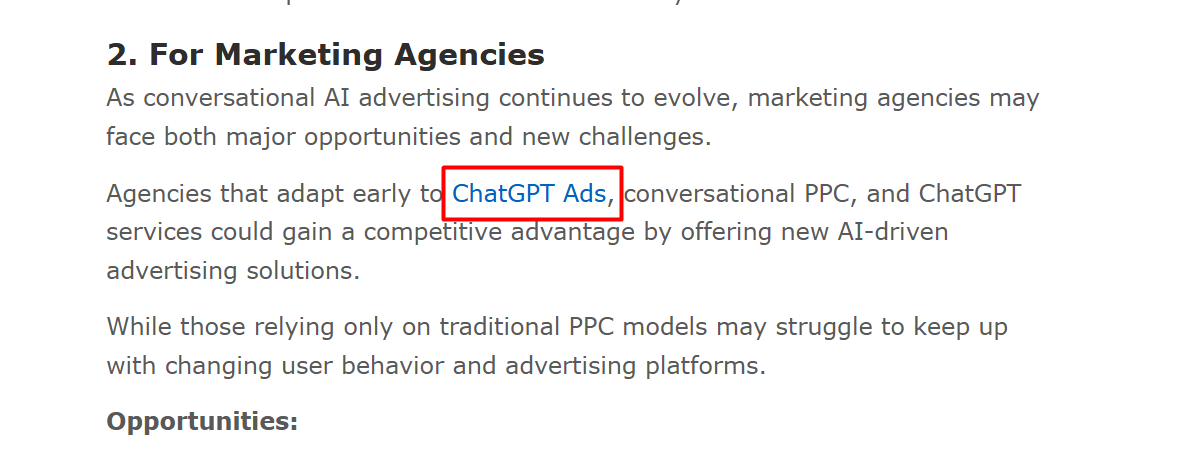
Contextual links are links placed naturally inside the content of a page or blog post. These are often the most valuable internal links because they connect related topics and provide additional context to both users and search engines.
3. Footer Links
Footer links appear at the bottom of a website and usually point to important pages such as About Us, Services, Privacy Policy, FAQs, or Contact pages.

4. Breadcrumb Links
Breadcrumb links show users where they are within your website structure and allow them to navigate back to broader categories. For example: Home → Blog → SEO → Internal Linking.
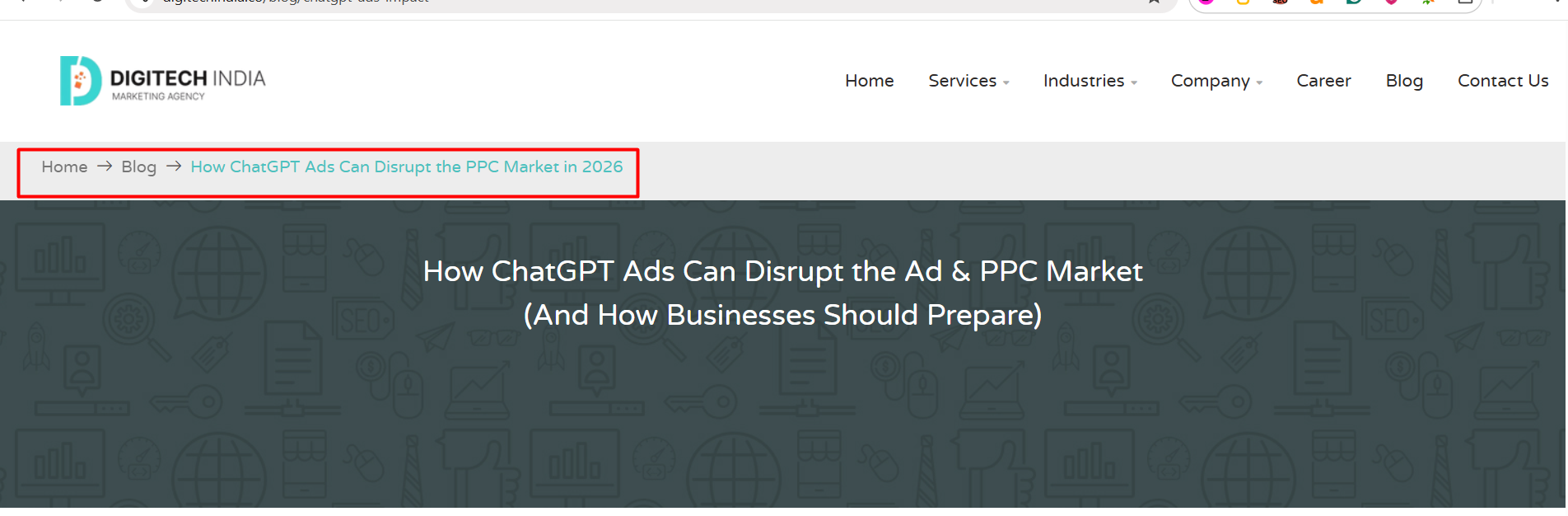
Each of these link types contributes to a stronger internal linking architecture, but contextual and navigational links usually have the biggest impact on SEO and content discoverability.
What Is Internal Linking Architecture?
Internal linking architecture is the way internal links are organized across your website to create a clear structure between pages. Instead of pages existing independently, they are connected intentionally to guide users and help search engines understand how your content relates to one another.
Think of it as the blueprint of your website. Every page should have a purpose and connect logically to other relevant pages.
A well-structured website usually follows a hierarchy. At the top, you have your most important pages, such as the homepage and service pages. Under those sit supporting pages like category pages, blog posts, guides, case studies, or location pages. Internal links connect these layers and make navigation easier.
For example:
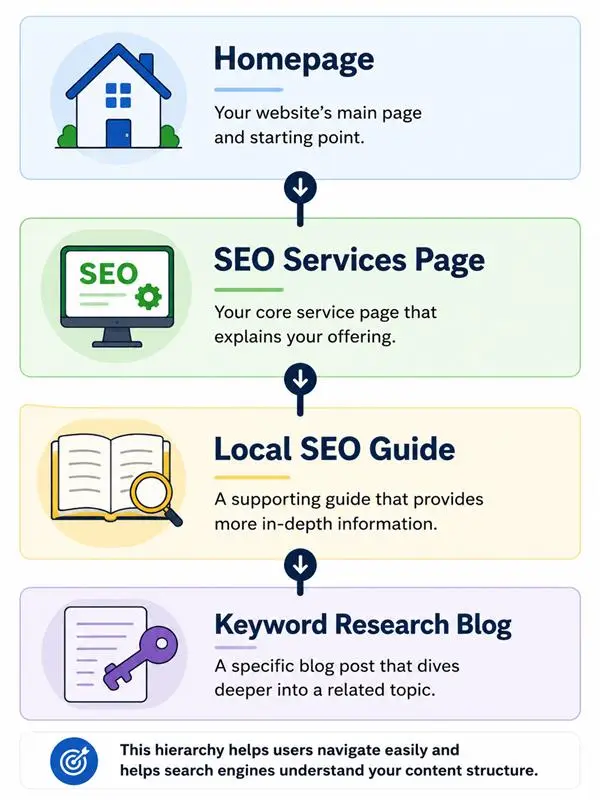
This structure helps search engines understand that all of these pages belong to a related topic.
Internal linking architecture also creates content relationships. When multiple pages covering related subjects are linked together, search engines can better understand topical relevance, and users can continue exploring your website naturally.
For small business websites, this becomes especially valuable because a strong internal linking structure helps important pages gain visibility without relying entirely on backlinks or constantly publishing new content.
How to Structure Internal Linking for a Small Business Website
A good internal linking structure should make it easy for users to find information and help search engines understand which pages matter most. Instead of linking pages randomly, create a clear path between your important pages and supporting content.
Start With Your Core Pages
Begin by identifying the pages that matter most to your business. These should become the center of your internal linking structure.
Core pages usually include:
-
Homepage
-
Service pages
-
About page
-
Contact page
Make sure:
-
Every important page is accessible from your navigation menu
-
Service pages receive links from relevant blogs
-
Users can reach key pages in only a few clicks
Build Topic Clusters Around Services
A topic cluster is a way of organizing content where one main page (usually a service page) is supported by multiple related articles or resources that link back to it. This helps search engines understand topical relevance and makes it easier for users to explore related content.
For a small business website, your service pages should act as the main pages, and supporting blogs should connect back to them.
Example:
SEO Services
↓
What Is Local SEO
↓
Keyword Research Guide
↓
On-Page SEO Checklist
Each supporting blog should:
-
Link back to the main service page
-
Link to related articles where relevant
-
Stay focused on the same topic area
This creates a stronger content relationship across your website.
Keep Important Pages Close to Homepage
Pages that are important for traffic or conversions should not be buried deep inside your website.
A simple rule:
-
Important pages → 1–3 clicks from homepage
-
Supporting pages → linked from categories or services
If users or search engines need too many clicks to reach a page, it may receive less attention.
Use Contextual Links Naturally
Add internal links where they genuinely help users continue learning or take action.
For example:
-
A blog about local SEO → link to your SEO service page
-
A pricing page → link to case studies
-
A guide → link to related tutorials
Avoid:
-
Adding too many links in one paragraph
-
Using the same anchor text everywhere
-
Linking pages that are not related
Create Category and Hub Pages
As your website grows, group related content together.
Examples:
-
SEO Services Hub
-
Blog Category Pages
-
Resources Page
Hub pages act as central pages that connect multiple related articles or services, making your website easier to navigate and maintain.
Internal Linking Best Practices
A strong internal linking strategy is not about adding more links, it is about creating meaningful connections between pages. These practices help keep your website organized and easier to navigate.
Use Descriptive Anchor Text
Anchor text is the clickable text used for a link. It should clearly tell users and search engines what they will find after clicking.
Good examples:
-
“Learn more about Local SEO services”
-
“Read our keyword research guide”
Avoid:
-
Click here
-
Read more
-
Learn more
Descriptive anchors provide better context and improve navigation.
Link to Relevant Pages Only
Every internal link should have a purpose. Link pages that naturally relate to the topic instead of forcing connections.
For example:
-
A blog about local SEO → link to Local SEO services
-
A website design page → link to website maintenance services
Avoid linking pages only to increase the number of internal links.
Avoid Orphan Pages
Orphan pages are pages that do not receive internal links from anywhere else on your website.
To prevent this:
-
Link new pages from existing content
-
Add important pages to navigation or category pages
-
Connect related blog posts together
If a page matters, users and search engines should be able to find it.
Keep Links Updated
As your website grows, some links may become outdated or point to pages that no longer exist.
Review your internal links regularly to:
-
Remove broken links
-
Replace outdated pages
-
Add links to newer content
Small updates over time keep your structure healthy.
Prioritize High-Value Pages
Not all pages have the same business value. Give more internal links to pages that support conversions and business goals.
Examples:
-
Service pages
-
Contact page
-
Important landing pages
-
High-performing blog posts
The pages that matter most should receive the strongest internal support across your website.
What the Data Reveals About Internal Linking Performance
Internal linking is more than simply adding links between pages, it's about creating a logical website structure that helps both users and search engines discover and understand your content. When done strategically, internal links improve crawlability, distribute authority across key pages, and enhance the overall user experience.
The examples and data sets below highlight the real-world impact of effective internal linking. From increased organic traffic to improved search rankings, these data-backed results demonstrate how optimizing your internal linking architecture can contribute significantly to a website's SEO performance and growth.
-
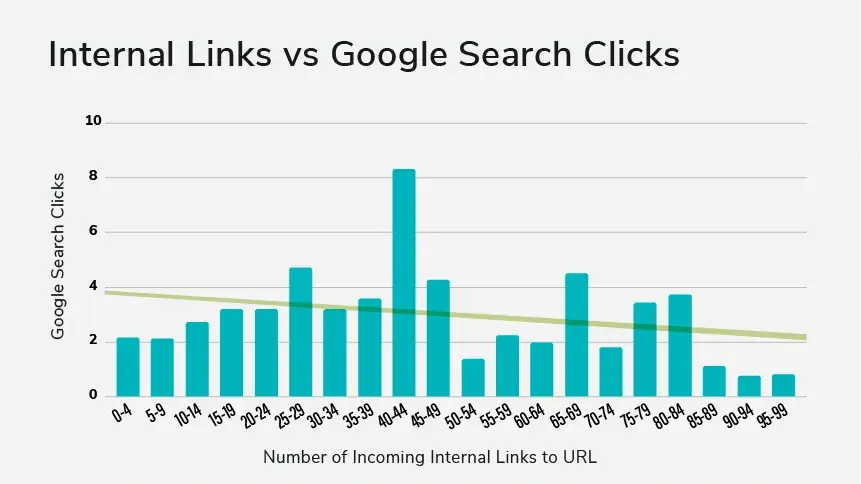
Pages with only 0–4 internal links received an average of 2 clicks from Google Search, whereas pages supported by 40–44 internal links earned approximately 8 clicks on average, a 4x increase in organic traffic potential.
-
Pages that receive links using diverse and relevant anchor text tend to provide stronger contextual signals to search engines. Using varied anchor text helps search engines better understand the topic and relevance of a page, improving its ability to rank for related search queries.
-
In a controlled SEO test conducted by SearchPilot, strengthening internal links between category pages led to an approximately 25% increase in organic traffic. The experiment also resulted in better rankings for deeper-level pages, demonstrating how strategic internal linking can improve visibility across an entire website rather than just individual pages.
Conclusion
Internal linking is more than connecting pages, it helps users navigate your website and allows search engines to better understand your content. A strong internal linking structure can improve SEO, increase engagement, and guide visitors toward conversion.
If you’re unsure where to start or want an internal linking strategy that delivers measurable results, DIGITECH India can help. Our team builds SEO-focused website structures that make navigation easier, improve visibility, and support long-term business growth. Reach out and start turning your website into a stronger growth channel.


